
A spreadsheet can handle thousands of rows without creating an operational problem. A ten-row spreadsheet can become a problem when several people need different permissions and someone keeps approving requests by changing the wrong cell.
The useful question is what the workflow asks the spreadsheet to enforce.
Start with the action people are trying to take
Consider a purchase-request sheet. Employees enter requests, managers approve them, and finance records payment. At first, a status column feels sufficient.
Then the team needs answers the sheet doesn’t make obvious. Can a requester approve their own purchase? Can someone change the amount after approval? Who should handle a request when the manager is away?
Those are rules about people and actions. Before choosing software, write down which ones matter:
| Workflow need | A workable spreadsheet approach | A reason to consider an app |
|---|---|---|
| Collect consistent information | A form feeds a controlled sheet | Different request types require different approval paths |
| Limit editing mistakes | Protected ranges and a small editor group | Users need access to different records or sensitive fields |
| Track progress | A status column and a named owner | Only certain roles may perform certain transitions |
| Preserve decisions | Notes and version history | You need a durable record of who approved which amount |
Google explicitly says protected sheets and ranges are not a security measure. Use them to reduce accidental edits, not as a substitute for access controls over information someone must not see.
Try the awkward case before the normal one
Walk through one request that changes after approval. In a workable process, the team can tell whether that change requires another approval and which version finance should pay.
If the answer depends on someone noticing a cell color, checking a chat message, and remembering an unwritten rule, the process has outgrown its current controls. Adding more tabs may make it harder to follow.
A small app could provide explicit actions: submit, request changes, approve, and record payment. The app should enforce who may take each action, preserve the approved amount, and tell the next person what needs attention.
Keep the parts that still work
Moving the workflow into an app doesn’t require abandoning spreadsheets for analysis. You may keep exports for finance, use a sheet to model a new policy, or leave a low-volume process where it is.
The first release should cover one complete path through the work. For the purchase example, that might mean request submission, manager approval, and a finance queue. Inventory forecasting and vendor scoring can wait until someone needs them.
Before building, compare that narrow requirement with software you already own. An existing form, approval feature, or task tool may cover it with less upkeep.
Test a changed amount before choosing an app
Use this hypothetical request in the software demonstration: a manager approves $450, then the requester changes it to $650. Finance should see which amount is authorized. An app that merely adds a status field to the same editable row has not solved the underlying problem.
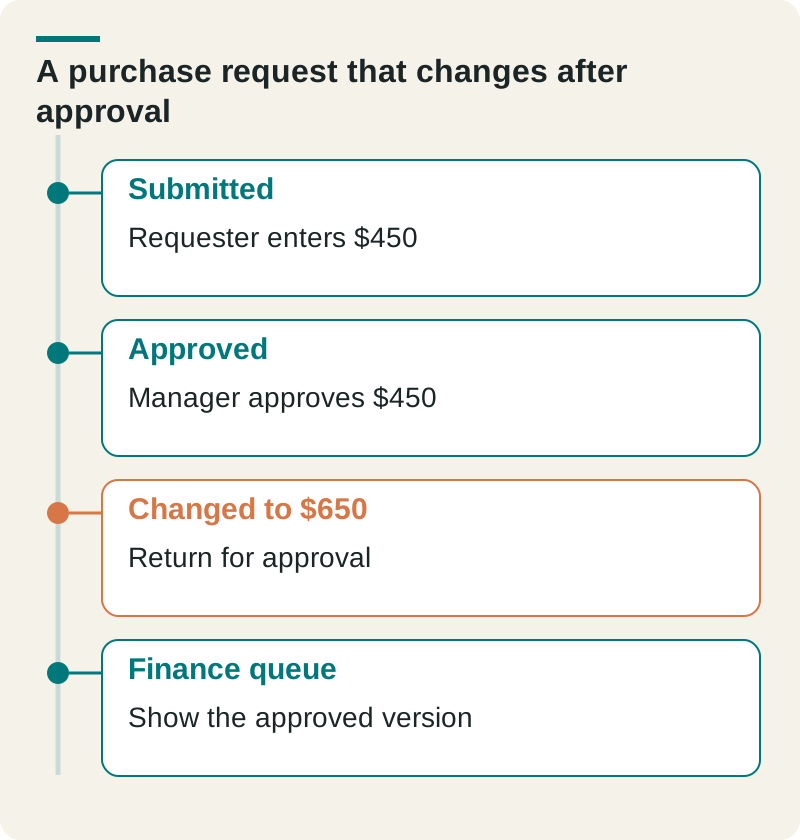
- Submitted
- Requester enters $450
- Approved
- Manager approves $450
- Changed to $650
- Return for approval
- Finance queue
- Show the approved version
Require the amount change to invalidate the approval or create a new version that needs approval. Test as the requester and finance user, not only as an administrator. Keep the original decision and the later change visible in the history.
Check this before you proceed
- Try editing a request after approval.
- Try approving your own request.
- Export the approval history for one request.
Download this article’s editable worksheet (CSV). Add your evidence, owner, and review date. For the next related decision, read Internal Tool Requirements: Define the Records, Actions, and Exceptions.
Make the decision around a recurring failure
“Our sheet looks messy” is a weak reason to commission software. “We can’t stop an approved amount from changing before payment” describes a problem you can design and test against.
Document the failure, its frequency, and the people involved. Then ask a proposed solution to handle a real example, including a rejected request and a changed amount. That demonstration is more useful than a tour of twenty features.
The Ops Guide builds internal software around these kinds of workflow rules. Bring the sheet and one frustrating case; those are a useful starting point for deciding whether an app is worth building.