Forget the futuristic stuff. The AI that actually pays back is boring and specific. It is not a robot strategist. It is taking a task your team does 200 times a week and making it take a fraction of the time.
The pattern is always the same: high-volume, repetitive work, done on data you already have. Here is where that shows up, by function.
Operations and admin
This is the quietest goldmine. The work is constant and rarely measured.
Generating documents and reports from a template
Scheduling and coordination
Data entry and moving information between systems
Summarizing long threads or meetings into action items
Why it pays: it is high-volume and invisible. Small time savings, multiplied across every day, add up fast.
Why it pays: more pipeline and more touches from the same headcount, so reps spend time selling, not prepping.
Finance and back office
Repetitive, rule-based, and high-stakes enough that speed and accuracy both matter.
Reconciliation and matching
Summarizing reports and flagging exceptions
Drafting routine financial communications
Why it pays: hours back every close, and fewer things slipping through.
How to pick yours
Notice none of these are exotic. The winners share three traits: high volume, repetitive, and built on data you already own. That is the filter.
When you have a few candidates, rank them by impact and feasibility so you start with the one most likely to win. We walk through exactly how in How to Prioritize AI Use Cases. And before you build, it is worth a quick check that the basics are in place, which is what Is Your Company AI-Ready? is for.
Rank candidates using net work removed
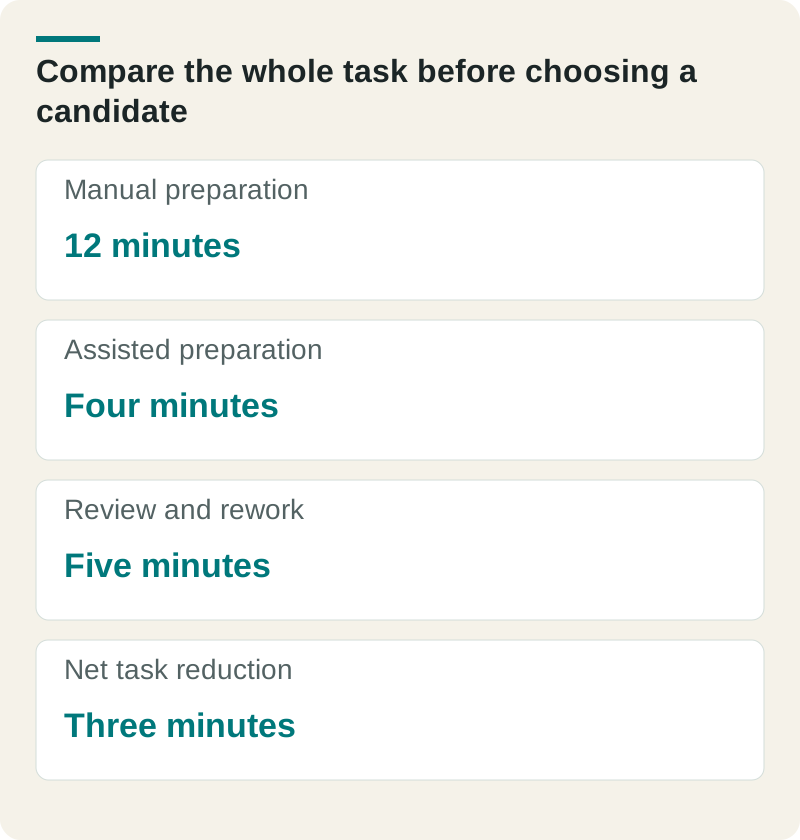
In this hypothetical candidate, AI cuts preparation from twelve minutes to four, but review and rework take five more. The net change is three minutes per task. At 100 tasks a week, that releases five hours before maintenance and training are counted.
Compare the whole task before choosing a candidate. Original planning aid from The Ops Guide. Any example figures are illustrative unless this article identifies a source.
Manual preparation
12 minutes
Assisted preparation
Four minutes
Review and rework
Five minutes
Net task reduction
Three minutes
Use the same calculation for another candidate and compare quality, permissions, integration effort, and available ownership. High volume is useful only when the output can be accepted and the freed capacity can be used. Treat the numbers as assumptions until a representative trial measures them.
The fastest way to find your highest-return use case is to look at where your team spends the most repetitive time. That is usually the answer, hiding in plain sight.
Our Fractional CAIO service helps choose the work that can help the business most, then leads the plan, rules, team adoption, and implementation.
Frequently asked questions
Q: What are the best AI use cases for a business?
A: The ones that are high-volume, repetitive, and run on data you already have: document and report generation, support reply drafting, sales research and follow-up, and finance reconciliation. Boring and specific beats flashy.
Q: Which department should use AI first?
A: Start where the repetitive time is greatest and the data is reachable. For many companies that is operations and admin or customer support, because the work is constant and easy to measure.
Q: How do I know if an AI use case will pay back?
A: Check three things: is the task high-volume, is it repetitive, and is the data already available. If yes to all three, estimate the hours saved and compare to the cost. That is your return.
Luke Thompson is Co-Founder and CEO of The Ops Guide. He writes about practical uses of AI, workflow automation, custom software, and SEO for growing businesses.