For most companies, customer support is where AI pays back the fastest. The work is high-volume and repetitive, which is exactly what AI is good at, and the data you need is your own past tickets.
Here is where it actually returns, and how to do it without hurting the customer experience.
Where AI pays back in support
Drafting replies. AI drafts a response to a common question, a human reviews and sends. Faster replies, consistent tone, less burnout on repetitive tickets.
Triage and routing. AI reads incoming tickets and routes them to the right person or queue, and flags the urgent ones. Less time spent sorting.
Answers from your own docs. AI surfaces the right answer from your help center and past tickets, so agents are not hunting for it.
Summarizing. Long threads and call notes get summarized into the key points and next action, which speeds handoffs.
None of these replace your team. They take the repetitive weight off so your people handle more, and handle the hard ones better.
Keep a human in the loop
The fastest way to damage trust is to let AI talk to customers unsupervised on day one. Start with AI drafting and a human approving. As you see where it is reliable, you can let the simplest, lowest-risk responses go faster. The point is earned trust, not blind automation.
How to measure it
Tie it to numbers your support team already cares about:
Handle time: how long a ticket takes start to finish.
First response time: how fast customers hear back.
Deflection: tickets resolved without an agent, where appropriate.
CSAT: make sure quality holds or improves, not just speed.
Set a baseline before you start, then compare. The method is the same one in How to Measure AI ROI.
The pitfalls
Replacing people instead of helping them. The win is capacity and speed, not a headcount cut that tanks quality.
Bad source data. If your help docs are out of date, AI will confidently surface wrong answers. Clean the source first.
No review step. Skipping human review early is how a small error becomes a customer-facing one.
Choose an escalation rule before the first draft
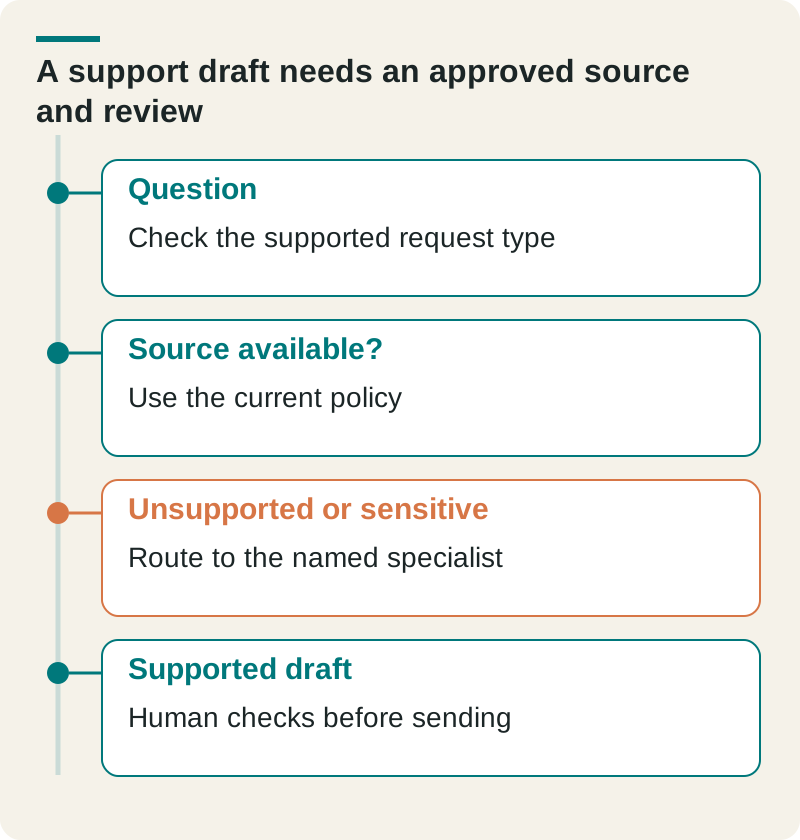
For a hypothetical returns assistant, start with a current return policy and a small set of supported request types. Include an expired-policy question and a request for an exception. The assistant should expose the uncertainty and route the exception to a person who can decide.
A support draft needs an approved source and review. Original planning aid from The Ops Guide. Any example figures are illustrative unless this article identifies a source.
Question
Check the supported request type
Source available?
Use the current policy
Unsupported or sensitive
Route to the named specialist
Supported draft
Human checks before sending
Measure accepted responses, review time, corrections, and escalations alongside drafting speed. Keep customer satisfaction and reopened cases visible. A reduction in handling time is useful only if the customer receives the right answer and the team can operate the escalation path.
Book a call and we will find where AI pays back in your support operation.
Frequently asked questions
Q: How is AI used in customer support?
A: Most commonly to draft replies for human review, triage and route tickets, surface answers from your own help docs, and summarize long threads. The highest return is on high-volume, repetitive tickets.
Q: Will AI replace customer support agents?
A: The better return is AI helping agents, not replacing them: handling the repetitive work so your team takes more tickets and focuses on the hard ones. Replacing people outright usually hurts quality and trust.
Q: How do I measure ROI on AI in support?
A: Baseline handle time, first response time, and CSAT before you start, then compare after. Count the full cost, including setup and review time. Improvement in speed without a drop in CSAT is the signal to scale.
Luke Thompson is Co-Founder and CEO of The Ops Guide. He writes about practical uses of AI, workflow automation, custom software, and SEO for growing businesses.